Railsではセッションの保存先(セッションストア)を指定できます。
3.2.58 config.session_store | Rails アプリケーションの設定項目 - Railsガイド
以前、セッションストアをRedisにしたときは、スタンドアロンRedisでの利用でした。
Rails7.0系で、キャッシュストアとセッションストアをRedisにしてみた - メモ的な思考的な
一方、RedisにはRedisクラスターという構成もあります。
そこで、Redisクラスターをセッションストアとして利用できるか試してみたことから、メモを残します。
目次
環境
- mac
- RubyMine 2025.3.2
- Redisクラスター
- docker composeで利用
- Redis 8.4のノードを3つ用意
- Railsアプリ
- mac上のDevContainerで構築
- Railsアプリの構成
- Ruby 3.4.8
- Rails 8.1.2
- Redisクラスターへ接続するgemの組み合わせは次の通り
- redis 4.8.1 + redis-actionpack 5.5.0
- redis 5.4.1 + redis-clustering 5.4.1
- redis gem 5系の場合、redis-actionpackは不要
スタンドアロンRedisをセッションストアにする
Redisクラスターをセッションストアにする前に、スタンドアロンRedisをRailsアプリのセッションストアにしてみます。
以前の記事でも試していますが、最新のRedis 8系であらためて試してみます。
rails new
今回は、必要最低限のRailsアプリで動作検証します。
セッションストアを利用することから、Cookieまわりのミドルウェアが必要です。 api オプションだとそれらのミドルウェアが含まれなくなるため、 minimal オプションを使います。
% bundle exec rails new . --minimal
Based on the specified options, the following options will also be activated:

  --skip-active-job [due to --minimal]
  --skip-action-mailer [due to --skip-active-job, --minimal]
  --skip-active-storage [due to --skip-active-job, --minimal]
  --skip-solid [due to --minimal]
  --skip-action-mailbox [due to --skip-active-storage, --minimal]
  --skip-action-text [due to --skip-active-storage, --minimal]
  --skip-javascript [due to --minimal]
  --skip-hotwire [due to --skip-javascript, --minimal]
  --skip-action-cable [due to --minimal]
  --skip-bootsnap [due to --minimal]
  --skip-brakeman [due to --minimal]
  --skip-bundler-audit [due to --minimal]
  --skip-ci [due to --minimal]
  --skip-dev-gems [due to --minimal]
  --skip-docker [due to --minimal]
  --skip-jbuilder [due to --minimal]
  --skip-kamal [due to --minimal]
  --skip-rubocop [due to --minimal]
  --skip-system-test [due to --minimal]
  --skip-thruster [due to --minimal]
コントローラもジェネレータで作成します。今回は
- POSTでセッションストアへデータ登録
- GETでセッションストアからデータを取得してレスポンス
を行いたいことから、 index と create を作ります。
% bin/rails generate controller Hellos index create
      create  app/controllers/hellos_controller.rb
       route  get "hellos/index"
      invoke  erb
      create    app/views/hellos
      create    app/views/hellos/index.html.erb
      invoke  test_unit
      create    test/controllers/hellos_controller_test.rb
      invoke  helper
      create    app/helpers/hellos_helper.rb
      invoke    test_unit
生成された hellos_controller.rb に index と create の各アクションを実装します。
class HellosController < ApplicationController
  skip_before_action :verify_authenticity_token, raise: false

  def index
    puts session[:message]
    render json: { message: session[:message] }
  end

  def create
    puts params[:message]
    session[:message] = params[:message]
    head :ok
  end
end
routes.rb のルーティングも整理します。
Rails.application.routes.draw do
  resources :hellos, only: [:index, :create]
end
スタンドアロンRedisをセットアップ
docker composeでスタンドアロンRedisを作成します。
Docker内でのネットワーク接続ができるよう、networks redis-network も作っておきます。
また、開発用途なので "--protected-mode", "no"も指定しておきます。
services:
  redis-single:
    image: redis:8.4.0-bookworm
    container_name: redis-single
    ports:
      - "17000:6379"
    command: ["redis-server", "--save", "", "--appendonly", "no", "--protected-mode", "no"]
    restart: unless-stopped
    networks:
      - redis-network

networks:
  redis-network:
    name: redis-network
準備ができたのでコンテナを起動します。
% docker compose up -d
[+] Running 2/2
 ✔ Network redis-network   Created
 ✔ Container redis-single  Started
Railsのセッションストアを設定
最後に、スタンドアロンRedisへ接続できるよう、Railsのセッションストアを設定します。
RailsのセッションストアをRedisにする方法としては、まず目についたのは redis-rails です。
https://github.com/redis-store/redis-rails
redis-railsのREADMEを読むと
We are still actively maintaining all other gems in the redis-store family, such as redis-actionpack for session management
とありました。
今回はセッションストアしか利用しないため、 redis-actionpack を使うことにします。
次に redis-actionpackの依存関係について、Gemfile.lockを見てみると
redis-actionpack (5.5.0)
  actionpack (>= 5)
  redis-rack (>= 2.1.0, < 4)
  redis-store (>= 1.1.0, < 2)
redis-store (1.11.0)
  redis (>= 4, < 6)
となっていたことから、 redis gemの4系以降が使えそうでした。
redis gemのバージョンの違いとしては
- 4系
- Redisクラスターに対応
- 5系
redisgem単体では非対応で、redis-clusteringgemに分離された
ようです。
Plan for redis-rb 5.0 · Issue #1070 · redis/redis-rb
これより、Redisクラスターにおける redis 4系と5系の違いをためしてみたくなりました。
そこで、スタンドアロンRedisを使うときのgemとバージョンの組み合わせは次として、あとで4系と5系の違いを試しやすくします。
- redis 4.8.1
- redis-actionpack 5.5.0
では、試していきます。bundle addします。
$ bundle add redis --version 4.8.1
...
Installing redis 4.8.1

$ bundle add redis-actionpack
...
Installing redis-store 1.11.0
Installing redis-rack 3.0.0
Installing redis-actionpack 5.5.0
次に config/initializers/session_store.rb にセッションストアの設定を行います。
redis-actionpack READMEのように文字列を指定できる他、servers に配列のハッシュを渡すこともできます。今回は後者で作ります。
https://github.com/redis-store/redis-actionpack?tab=readme-ov-file#usage
ここで、hostは redis-single というDockerコンテナを指定します。DevContainerからスタンドアロンRedisのDockerへ、Dockerのネットワークを使って接続するためです。
portも同様に、Dockerのネットワーク内から接続するため 6379 を指定します。
Rails.application.config.session_store :redis_store,
                                       servers: [
                                         {
                                           host: "redis-single",
                                           port: 6379,
                                           db: 0,
                                           namespace: "session"
                                         }
                                       ],
                                       expire_after: 90.minutes,
                                       key: "_redis_cluster_example_session"
DevContainerをセットアップ
RailsのDevContainerをセットアップするため、 .devcontainer/devcontainer.json を用意します。
Redis CLIだけをインストールするのは色々手間がかかりそうだったため、今回はサードパーティのFeatureでインストールしています。
また、何かあったとき用にAIエージェントをインストールできるよう、DevContainerのFeatureとしてNode.jsを追加します。
https://github.com/devcontainers/features/tree/main/src/node
これらを踏まえたRailsを動かすためのDevContainer向けの devcontainer.jsonは次の通りです。
{
  "name": "rails_local2devcontainer-example",
  // Rails公式のDevContainerを利用
  "image": "ghcr.io/rails/devcontainer/images/ruby:3.4.8",
  "mounts": [
    "source=${localEnv:HOME}/.agent/codex/.codex,target=/home/vscode/.codex,type=bind,consistency=cached",
  ],
  "features": {
    "ghcr.io/devcontainers/features/node:1": {},
    // curlなどのツールを導入しておく
    "ghcr.io/devcontainers/features/common-utils:2": {},
    // サードパーティのRedis CLIを入れる
    "ghcr.io/42atomys/devcontainers-features/redis-cli:1": {}
  },
  // 外部からコンテナのRailsへアクセスできるようポートフォワードする
  "forwardPorts": [3000],
  // Redisのネットワークへ接続できるようにする
  "runArgs": [
    "--network", "redis-network"
  ],
  // RubyMine向けのワークアラウンドやnpm installするため、postCreateCommandを用意する
  "postCreateCommand": ".devcontainer/postCreateCommand.sh",
  "customizations": {
    "jetbrains": {
      "plugins": [
        "com.github.thinkami.railroads",
        "com.intellij.plugins.mnemonicKeymap"
      ]
    }
  }
}
今回RubyMineでDevContainerを起動するため、 postCreateCommand.shも用意します。
#!/bin/sh
set -eu

# DevContainerを起動する前に、このファイルを `chmod +x postCreateCommand.sh` しておく

# RubyMine 2025.3.1 の既知の不具合
# https://youtrack.jetbrains.com/projects/RUBY/issues/RUBY-34350/Cannot-find-Ruby-interpreter-in-the-Rails-devcontainer
# ただし、プライベートなgemのインストールがあるため、最後の `bin/setup --skip-server` は実行せず、コンテナ内で自分で実行する
sudo mkdir -p /.jbdevcontainer/config /.jbdevcontainer/data && sudo chmod -R 777 /.jbdevcontainer && ln -s /home/vscode/.config/mise /.jbdevcontainer/config/mise && ln -s /home/vscode/.local/share/mise /.jbdevcontainer/data/mise

npm install -g @openai/codex@latest
あとはRubyMineからDevContainerを、DevContainerの中でRailsをそれぞれ起動します。以前の記事同様のやり方で起動できます。
既存のRailsアプリを単体でDevContainer化し、RubyMineのDevContainerとして動かしてみた - メモ的な思考的な
動作確認
DevContainerで forwardPorts を定義していることから、macのターミナルで curl による動作確認が行えます。
まずはPOSTです。複数回のcurlでセッションを共有できるよう、 -c オプションでCookie情報をファイルへと保存します。
% curl -X POST http://localhost:3000/hellos -d "message=hello" -c cookies.txt
Railsのログを見ると、curlからのデータを受け取っていました。
Started POST "/hellos" for 127.0.0.1 at 2026-01-26 22:29:31 +0900
...
Processing by HellosController#create as */*
  Parameters: {"message" => "hello"}
hello
次に -b オプションで先ほど使ったCookieを利用して、セッションのデータを取得します。レスポンスを見る限り、セッションにデータが保存されているようでした。
% curl -b cookies.txt http://localhost:3000/hellos
{"message":"hello"}
RubyMineでRedisの中身を確認します。スタンドアロンRedisへ接続するための設定は次の通りです。

Redisへ接続できたので確認すると、データが含まれていました。

最後に、DevContainerのRedis CLIでも中身を確認してみます。
scanでセッションのキーを取得後、getでセッションの中身を取得します。
$ redis-cli -c -h redis-single -p 6379 --scan
"session:2::36334d75885e1c87c38636160d0058aa8ef7b8e9a76727142c1727c102bdecc4"

$ redis-cli -c -h redis-single -p 6379 get "session:2::36334d75885e1c87c38636160d0058aa8ef7b8e9a76727142c1727c102bdecc4"
"\x04\b{\x06I\"\x0cmessage\x06:\x06EFI\"\nhello\x06;\x00T"
Rails Consoleで取得できた文字列をデコードしてみると、セッションに入れた値になっていました。良さそうです。
Loading development environment (Rails 8.1.2)
>> Marshal.load("\x04\b{\x06I\"\x0cmessage\x06:\x06EFI\"\nhello\x06;\x00T")
=> {"message" => "hello"}
Redisクラスターをセッションストアにする
スタンドアロンRedisをセッションストアにすることができたので、次はRedisクラスターをセッションストアにしてみます。
Redisクラスターをセットアップ
以前はbitnami版のRedisクラスターを使うのがお手軽だったようですが、現在では利用できなさそうです。そのため、RedisのDockerイメージをベースに作成します。
https://hub.docker.com/_/redis
今回は、compose.yml にRedisクラスター用コンテナとクラスタ構築用コンテナを追加します。なお、今回は動作確認が目的なので、次のような作りとしました。
services:
  # ...
  # Redisクラスターノード1
  redis-cluster-node-1:
    image: redis:8.4-bookworm
    container_name: redis-cluster-node-1
    command: redis-server --cluster-enabled yes --cluster-config-file nodes.conf --cluster-node-timeout 5000 --appendonly no
    ports:
      - "17001:6379"
    networks:
      - redis-network

  # Redisクラスターノード2
  redis-cluster-node-2:
    image: redis:8.4-bookworm
    container_name: redis-cluster-node-2
    command: redis-server --cluster-enabled yes --cluster-config-file nodes.conf --cluster-node-timeout 5000 --appendonly no
    ports:
      - "17002:6379"
    networks:
      - redis-network

  # Redisクラスターノード3
  redis-cluster-node-3:
    image: redis:8.4-bookworm
    container_name: redis-cluster-node-3
    command: redis-server --cluster-enabled yes --cluster-config-file nodes.conf --cluster-node-timeout 5000 --appendonly no
    ports:
      - "17003:6379"
    networks:
      - redis-network

  # クラスタ初期化用コンテナ
  redis-cluster-init:
    image: redis:8.4-bookworm
    depends_on:
      - redis-cluster-node-1
      - redis-cluster-node-2
      - redis-cluster-node-3
    # クラスタ作成コマンドを実行
    command: >
      sh -c "sleep 5 &&
      echo 'yes' | redis-cli --cluster create
      redis-cluster-node-1:6379
      redis-cluster-node-2:6379
      redis-cluster-node-3:6379
      --cluster-replicas 0"
    networks:
      - redis-network
# ...
今までのコンテナを落としてから、再度コンテナを起動します。
% docker compose down -v
% docker compose up -d
redis 4系 + redis_actionpackによる接続
まずはスタンドアロンRedisへの接続でも使用した redis 4系 + redis_actionpackにて接続します。
スタンドアロンRedis向けの設定ではRedisクラスターへ接続できないことから、次の記事を参考に session_store.rbの設定を変更します。
RubyのRedis Client LibraryをCluster Modeに対応させた話 - LIVESENSE ENGINEER BLOG
cluster 引数には、 compose.ymlで作成したRedisクラスターのノードとポートを指定します。
Rails.application.config.session_store :redis_store,
                                       redis_store: Redis::Store.new(
                                         cluster: %w[
                                           redis://redis-cluster-node-1:6379
                                           redis://redis-cluster-node-2:6379
                                           redis://redis-cluster-node-3:6379
                                         ],
                                         namespace: "session"
                                       ),
                                       expire_after: 90.minutes,
                                       key: "_redis_cluster_example_session"
続いて、curlで動作確認をします。curlに渡す値はスタンドアロンRedisと同様です。
% curl -X POST http://localhost:3000/hellos -d "message=hello" -c cookies.txt

% curl -b cookies.txt http://localhost:3000/hellos
{"message":"hello"}
処理が成功したため、RubyMineでRedisクラスターの様子を確認します。
RubyMineの公式ドキュメントを参考に、Redisクラスター向けに接続情報を変更します。
今回は次のようになります。
| 項目 | 値 |
|---|---|
| Connectiontype | cluster |
| Authentication | No auth |
| URL | jdbc:redis:cluster://redis-cluster-node-1:6379,redis-cluster-node-2:6379,redis-cluster-node-3:6379 |
確認したところ、Redisクラスターにデータが保存されていました。
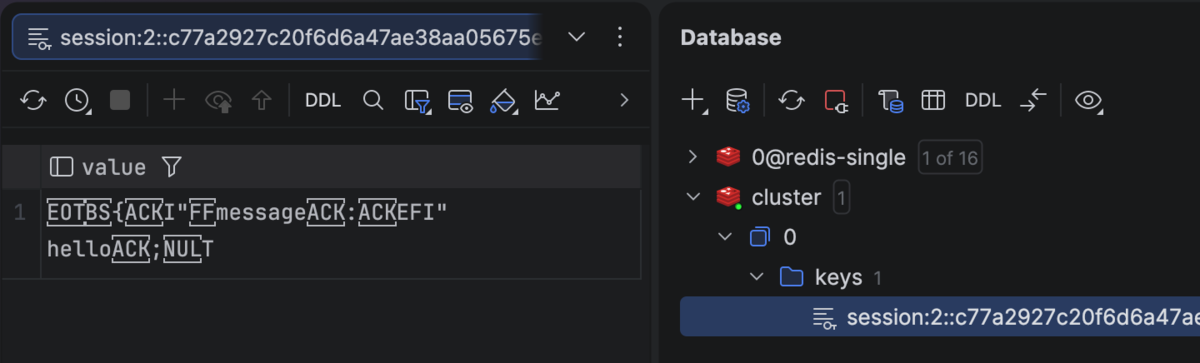
続いて、Redis CLIでも確認してみます。
Redisクラスターのどのノードにデータが保存されているかわからないため、ノードごとに --scan します。今回は redis-cluster-node-3 へ保存されていたため、そこに対して get で値を取得します。
スタンドアロンRedisと同じ値が設定されていました。
$ redis-cli -c -h redis-cluster-node-3 -p 6379 --scan
"session:2::c77a2927c20f6d6a47ae38aa05675eda1e3f56a370e1a6c47ddb8eac8f95dbbd"

$ redis-cli -c -h redis-cluster-node-3 -p 6379 get "session:2::c77a2927c20f6d6a47ae38aa05675eda1e3f56a370e1a6c47ddb8eac8f95dbbd"
"\x04\b{\x06I\"\x0cmessage\x06:\x06EFI\"\nhello\x06;\x00T"
続いて、 redis 5系 + redis_actionpack だとどうなるかを試してみます。
bundle update で更新します。
$ bundle update redis
...
Installing redis-client 0.26.4
Installing redis 5.4.1 (was 4.8.1)
Bundle updated!
Railsを起動しようとすると、エラーになりました。redis gemのREADMEにある通り、redis gemの5系では redis-clusteringとともに使う必要がありそうです。
https://github.com/redis/redis-rb/tree/master?tab=readme-ov-file#cluster-support
=> Run `bin/rails server --help` for more startup options
Exiting
/home/vscode/.local/share/mise/installs/ruby/3.4.8/lib/ruby/gems/3.4.0/gems/redis-5.4.1/lib/redis.rb:138:in 'Redis#initialize_client': Redis Cluster support was moved to the `redis-clustering` gem. (RuntimeError)
redis 5系 + redis-clusteringによる接続
では、redis 5系 + redis-clustering 構成での接続を試してみます。
まず、redis-clustering gemを追加します。
一緒に追加された redis-cluster-client については次の作者の記事が参考になります。
- RESP3対応版のRedis用Ruby Gems(redis-client/redis-cluster-client)のご紹介 - LIVESENSE ENGINEER BLOG
- redis-cluster-client gem開発の振り返り - LIVESENSE ENGINEER BLOG
$ bundle add redis-clustering
...
Installing redis-cluster-client 0.13.7
Installing redis-clustering 5.4.1
Bundle complete! 9 Gemfile dependencies, 78 gems now installed.
再びRailsを起動しようとしたところ、同じエラーになりました。
Redis Cluster support was moved to the `redis-clustering` gem. (RuntimeError)
redis gemと redis-clustering gemを組み合わせて使う方法がないかを調べたところ、次のissueが見つかりました。
Proper documentation on how to setup rails to connect to a redis cluster for session management · Issue #1280 · redis/redis-rb
その中で、Railsのコアコミッターであるbyrootさんが :cache_storeを使う旨をコメントしていました。
https://github.com/redis/redis-rb/issues/1280#issuecomment-2111358279
そこで、session_store.rb を差し替えてみました。
Rails.application.config.session_store :cache_store,
                                       cache: ActiveSupport::Cache::RedisCacheStore.new(
                                         redis: Redis::Cluster.new(nodes: %w[
                                           redis://redis-cluster-node-1:6379
                                           redis://redis-cluster-node-2:6379
                                           redis://redis-cluster-node-3:6379
                                         ]),
                                         namespace: "session_redis5"
                                       ),
                                       expire_after: 90.minutes,
                                       key: "_redis_cluster_example_session"
この設定にしたことで、Railsが問題なく起動しました。
そこで、 curlを使って動作確認をすると、想定通りの結果が返ってきていました。
% curl -X POST http://localhost:3000/hellos -d "message=hello" -c cookies.txt

% curl -b cookies.txt http://localhost:3000/hellos
{"message":"hello"}
RubyMineでRedisクラスターの中身を確認したところ、保存されているようでした。

Redis CLIでも確認してみたところ、今度は redis-cluster-node-2へ保存されていました。
ただ、redis gem4系の :redis_store とは格納されている値が異なってそうでした。
$ redis-cli -c -h redis-cluster-node-2 -p 6379 --scan
"session_redis5:_session_id:2::1d434ac6474f679214bde8d3e19480c0bb75439f622049ac1a0af1a08238737d"

$ redis-cli -c -h redis-cluster-node-2 -p 6379 get "session_redis5:_session_id:2::1d434ac6474f679214bde8d3e19480c0bb75439f622049ac1a0af1a08238737d"
"\x00\x11\x01\xd8\xac\x9c\xdf\xd7^\xdaA\xff\xff\xff\xff\x04\b{\x06I\"\x0cmessage\x06:\x06EFI\"\nhello\x06;\x00T"
そこで、中身を確認できるようなRubyスクリプトをAIに作ってもらいました。
# Redisクラスターから取得した値を貼り付け
s = "\x00\x11\x01\xd8\xac\x9c\xdf\xd7^\xdaA\xff\xff\xff\xff\x04\b{\x06I\"\x0cmessage\x06:\x06EFI\"\nhello\x06;\x00T".b

sig = s[0,2] # => "\x00\x11"
type, expires_at, version_len = s.byteslice(2, 13).unpack("CEl>")
offset = 2 + 13
version = (version_len >= 0) ? s.byteslice(offset, version_len) : nil
offset += (version_len >= 0 ? version_len : 0)
payload = s.byteslice(offset, s.bytesize - offset)
puts Marshal.load(payload)
このスクリプトを実行したところ、次の結果が得られました。想定通りの値でした。
$ ruby decode.rb
{"message" => "hello"}
ところで、 redis-clusteringを使う場合は redis-actionpackは不要そうでした。
そこで、Gemfileから redis-actionpackを削除し、動作確認をします。今回は最初のPOSTのデータを少し変えて message=world としています。
すると、良さそうな結果が返ってきました。
% curl -X POST http://localhost:3000/hellos -d "message=world" -c cookies.txt

% curl -b cookies.txt http://localhost:3000/hellos
{"message":"world"}
Redis CLIで確認したところ、 redis-cluster-node-1 に保存されていました。また、get したときに world という文字列が見えました。
$ redis-cli -c -h redis-cluster-node-1 -p 6379 --scan
"session_redis5:_session_id:2::dc555d52881bdde8959fc8dcf44c48b1bf474339cc2e217dff83f0cfbec7af31"

$ redis-cli -c -h redis-cluster-node-1 -p 6379 get "session_redis5:_session_id:2::dc555d52881bdde8959fc8dcf44c48b1bf474339cc2e217dff83f0cfbec7af31"
"\x00\x11\x01_\xac\x1fg\xd8^\xdaA\xff\xff\xff\xff\x04\b{\x06I\"\x0cmessage\x06:\x06EFI\"\nworld\x06;\x00T"
これより、 redis-actionpack なしで、 redis 5系 + redis-clustering で使えると分かりました。
ソースコード
GitHubに上げました。
https://github.com/thinkAmi-sandbox/rails_session_with_redis_cluster-example
redis 4系 + redis-actionpackのプルリクはこちら。
https://github.com/thinkAmi-sandbox/rails_session_with_redis_cluster-example/pull/1
redis 5系 + redis-clusteringのプルリクはこちら。
https://github.com/thinkAmi-sandbox/rails_session_with_redis_cluster-example/pull/2
